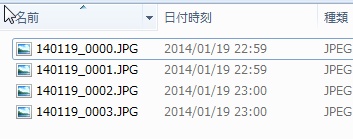
[VBA]関数へObjectを渡した時、”ByRef引数の型が一致しません”エラーが出たら

関数の引数にObjectの変数を渡したとき”ByRef引数の型が一致しません”エラーが出た。
調べてみたところ、変数の型指定を明示してあげると上手く動いた。

ダメパターン:変数paramListの型を明示していない。

Sub MainFunc()
    Set paramList = CreateObject("Scripting.Dictionary")
    SubFunc(paramList)
End Sub
 
Function SubFunc(paramList As Object)
	' do something
End Function


OKパターン:paramListをObject型として定義している。

Sub MainFunc()
	Dim paramList As Object
    Set paramList = CreateObject("Scripting.Dictionary")
    SubFunc(paramList)
End Sub
 
Function SubFunc(paramList As Object)
	' do something
End Function

[VBA]DictionaryをFor Eachで回すときの書き方

DictionaryをFor Eachで回したい時、Inで各要素を受け取るデータ型はvariant型にします。
For Eachで、受け取れるのはkey/vauleの内keyの方です。

value側はparamList.Item(curKey)な感じで、取得します。
これは、ハッシュ検索になるのでO(1)の計算量となるので速度は十分に速いです。

Dim curKey As Variant
 
Set paramList = CreateObject("Scripting.Dictionary")
paramList.Add "key1", "val1"
paramList.Add "key2", "val2"
 
For Each curKey In paramList
    Debug.Print curKey
    Debug.Print paramList.Item(curKey)
Next
 
' キーを指定して削除
objDic.Remove(strDelKey)
 
' 全削除
objDic.RemoveAll    
 
Debug.Print objDic.Count


[Unity]uGUIで、ボタンのクリックイベントを自動でセットする。

UnityのuGUIを使用してボタンを作る場合、Unityのインスペクタで設定するか、もしくはボタンのonClick.AddListener()メソッドを使用してイベントハンドラの登録が必要です。

画面中に存在するボタンが少ない場合はこの方法で問題ないのですが、
ボタンの数が多くなってくるとこの作業が大変になってきます。

このような場合は、リフレクションクラスを使うと、
名前合わせでイベントハンドラを自動登録することができます。

下記のコードを使用すると、例えば下記の場合にbtnStartのOnClickイベントとしてbtnStart_Onclick()を割り当ててることができます。
1.Hierarchy上に”btnStart”という名前を持つuGUIのボタンがある。
2.本スクリプト上にbtnStart_Onclick()メソッドがある。


これで、面倒なハンドラの登録を手動で行う必要がなく効率よく開発を行うことができます。

using UnityEngine;
using UnityEngine.UI;
using System.Collections;
using System.Reflection;
 
public class MainSceneScript : MonoBehaviour {
 
    void Start () {
        //ボタンがクリックされたときのハンドラを登録
        SetButtonClickHandler();
    }
 
    // Startボタンがクリックされたときのハンドラ
    public void BtnStart_OnClick() {
        Debug.Log ("BtnStart_OnClickがコールされました");
    }
 
    // 解答ボタンがクリックされたときのハンドラ
    public void BtnAnswer_OnClick() {
        Debug.Log ("BtnAnswer_OnClickがコールされました");
    }
 
 
    /// <summary>
    /// ボタンにイベントハンドラを割り当てる。
    /// ex:Hierarchy上に"btnStart"という名前を持つuGUIのボタンがあり、
    ///    かつ、本スクリプト上にbtnStart_Onclick()メソッドがある場合、
    ///    btnStartのOnClickイベントとしてbtnStart_Onclick()を割り当てる。
    /// </summary>
    private void SetButtonClickHandler() {
 
        // ボタン一覧を取得
        Button[] buttonList = FindObjectsOfType<Button>();
 
        // メソッド一覧を取得
        BindingFlags flags = BindingFlags.Public | BindingFlags.NonPublic | BindingFlags.Instance | BindingFlags.Static;
        MethodInfo[] methodList = this.GetType().GetMethods( flags );
 
        // すべてのボタンにハンドラを登録するまで繰り返し
        foreach (Button curBtn in buttonList ) {
            string searchMethodName = curBtn.name.ToUpper() + "_ONCLICK";
 
            // ボタンへイベントハンドラを登録する
            MethodInfo handlerMethod = null;
            foreach ( MethodInfo curMethod in methodList ) {
                // ボタン名 + "_OnClick"の名前のメソッド以外はSkip
                if ( curMethod.Name.ToUpper() != searchMethodName ) {
                    continue;
                }
 
                // ボタンクリック時のハンドラを登録する
                curBtn.onClick.AddListener( delegate { curMethod.Invoke( this, null ); } );
                Debug.Log( "クリックのイベントハンドラを登録しました name=" + curBtn.name );
                break;
            }
        }
    }
}


[Unity3D]uGUIでボタンクリック時のハンドラをスクリプトで登録する

UnityでuGUIのボタンクリックに対するイベントハンドラを登録したい時は、
AddListenerメソッドを使用します。

using UnityEngine;
using UnityEngine.UI;
using System.Collections;
 
 
public class MainSceneScript : MonoBehaviour {
    public Button btnStart;
 
    void Start () {
        // スタートボタンがクリックされたときのハンドラを登録
        btnStart.onClick.AddListener (OnButtonClick);
    }
 
    // ボタンがクリックされたときのハンドラ
    void OnButtonClick() {
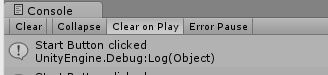
        Debug.Log ("Start Button clicked");
    }
}


スクリプトを登録したら、対象ボタンをInspectorで登録します。


プログラムを実行し、登録したボタンをクリックするとハンドラが実行されます。


[Unity3D]Hierarchyに存在するGameObjectを検索する

Unityで、スクリプトからGameObjectや、ほかのコンポーネントを検索する方法です。

GameObjectの検索方法


名前を指定して検索する場合

GameObject player = GameObject.Find( "Player" );


タグを指定して検索する場合

GameObject player = GameObject.FindGameObjectWithTag( "Tag_Player" );


ルートのGameObjectを取得する

GameObject parent = transform.root.gameObject;


メインカメラのGameObjectを取得する

GameObject camera = Camera.main;


Componentの検索方法


検索したGameObjectから、GameObjectが持っているComponentを検索する

PlayerScript playerScript = player.getComponent<PlayerScript>();
playerScript.AddHp( 100 );


Componentが既に分かっている状態で、自分のコンポーネントが属するGameObjectの他コンポーネントを検索する(衝突判定などでよく使う)

void OnTrigerEnter2D( Collider2D target ) {
    if ( target.tag == "bullet" ) {
        BulletScript bulletScript = target.gameObject.GetComponent<BulletScript>();
        int Damage = bulletScript.getDamage();
    }
}


特定のクラスのGameComponentを取得する

Button curBtn = FindObjectOfType<Button>();


特定のクラスのGameComponentを、すべて取得する。
Activeでは無いものまで取りたい場合は、FindObjectsOfTypeAll()を使う。

foreach (Button curBtn in FindObjectsOfType<Button>()) {
    Debug.Log ( "ボタン名 :" + curBtn.name );
}

[AWS]Amazon RDSの、MySQL 5.5と5.6に対するパッチ適用について

AWSより、Amazon RDSのMySQL 5.5と5.6に対して、パッチが適用される旨のアナウンスがありました。

Dear Amazon RDS Customer,

On October 16th, Oracle announced security vulnerabilities and associated software patches affecting MySQL 5.5 and 5.6: http://www.oracle.com/technetwork/topics/security/cpuoct2014-1972960.html#AppendixMSQL.

To address these vulnerabilities, your database instances must be upgraded to either MySQL 5.5.40 or 5.6.21.
Amazon RDS will make the new MySQL versions available by 12:00PM PDT on Friday, 17 Oct 2014.
You may choose to manually upgrade your instances at that time or wait for the next regular maintenance window during which we will automatically perform the upgrades.
At the time of the upgrade, your database instances (either Single-AZ or Multi-AZ) will undergo a reboot and will be unavailable for a few minutes.

All 5.5 and 5.6 database instances which have not been upgraded by customers will be upgraded during their maintenance windows between 12:00 PM PDT on Monday, 20 Oct 2014 and 11:59PM PDT on Monday, 27 Oct 2014.
You can upgrade at a time of your choosing before your maintenance window by using the Modify operation.
Note that this mandatory upgrade will take place even if you selected ‘No’ for the Auto Minor Version Upgrade option.

For more information about these vulnerabilities, please visit:
* AWS Security Bulletin page: https://aws.amazon.com/security/security-bulletins/
* Oracle’s Critical Patch Update regarding these vulnerabilities (CVE-2014-6491, CVE-2014-6494, CVE-2014-6500, CVE-2014-6559): http://www.oracle.com/technetwork/topics/security/cpuoct2014-1972960.html#AppendixMSQL

For more information about upgrading your database instance, please visit: http://docs.aws.amazon.com/AmazonRDS/latest/UserGuide/USER_UpgradeInstance.html

Sincerely,
AWS Support

Amazon Web Services, Inc. is a subsidiary of Amazon.com, Inc. Amazon.com is a registered trademark of Amazon.com, Inc. This message was produced and distributed by Amazon Web Services Inc., 410 Terry Ave. North, Seattle, WA 98109-5210


ざっくり意訳すると、以下のような感じかと思います。

Amazon RDS ユーザへ
Oracleが、10月16日にセキュリティ上の脆弱性とMySQL 5.5および5.6へのソフトウェアパッチを発表しました。
http://www.oracle.com/technetwork/topics/security/cpuoct2014-1972960.html#AppendixMSQL


脆弱性に対処するために、データベース·インスタンスをMySQL 5.5.40または5.6.21のいずれかにアップグレードする必要があります。
2014/10/17 12:00p.m. PDTに、新しいMySQLのバージョンを利用でき、Amazon RDSおアップグレードは、ユーザの手動実行か、AWSによる自動実行で適用されます。
それまでの間、AWSによる次の定期メンテナンスの待機を選択できます。

アップグレードの際、数分間の再起動中はDBを使用できません(SingleAZ、MultiAZのいずれか)

アップグレードされていない5.5と5.6のMySQL DBは一度にアップグレードでき、2014/10/20 PM12:00 PDTから2014/10/27 PM11:59 PDTにアップグレードされます
メンテナンス期間の前にアップグレードのタイミングを指定できますが、このアップデートは、Auto Minor Version UpgradeがNoの時は行われないので注意してください。


これらの脆弱性の詳細については、以下のサイトに記載されています。
* AWSセキュリティ情報ページ: https://aws.amazon.com/security/security-bulletins/
*(CVE-2014-6491, CVE-2014-6494, CVE-2014-6500, CVE-2014-6559)に関するOracleのクリティカル·パッチ·アップデート: http://www.oracle.com/technetwork/topics/security/cpuoct2014-1972960.html#AppendixMSQL

アップグレードの詳細は以下のサイトに記載されています。
http://docs.aws.amazon.com/AmazonRDS/latest/UserGuide/USER_UpgradeInstance.html

[chrome]独立したプロファイルを指定して、モバイル用UAでGREEにアクセスする

以下のコマンドをbatファイルを作成すると、モバイル用サイトにアクセスできます。
例ではAndroid2.3として、GREEにアクセスしています。

"C:\Program Files (x86)\Google\Chrome\Application\chrome.exe" --user-agent="Mozilla/5.0 (Linux; U; Android 2.3.2; ja-jp; SonyEricssonSO-01C Build/3.0.D.2.79) AppleWebKit/533.1 (KHTML, like Gecko) Version/4.0 Mobile Safari/533.1" --user-data-dir="c:\ChromeProfile\gree"  http://games.gree.net/


パラメータの意味は下記の通り

--user-agent
   UAの指定
--user-data-dir
   プロファイルの置き場所

[Unity]実機確認時にログを画面に出す

Unityでデバッグを行っている際、開発環境だとDebug.Log()でログを出力できます。

ですが、実機でデバッグしている場合は、Debug.Log()の出力が確認できません。

リモートデバッグを行えばログの確認が行えますが、そこまで手間をかけたくない場合は下記のコードで画面にログを出力できます。

// ログの出力
void Update () {
    log(" Time sinse fromStartup : " + Time.realtimeSinceStartup + "[12345678901234567890]");
    return;
}
 
// ログの記録
private static List<string> logMsg = new List<string>();
public static void log(string msg) {
    logMsg.Add(msg);
    // 直近の5件のみ保存する
    if ( logMsg.Count > 5 ) {
        logMsg.RemoveAt( 0 );
    }
}
 
// 記録されたログを画面出力する
void OnGUI() {
    Rect rect = new Rect( 0, 0, Screen.width, Screen.height );
 
    // フォントサイズを10px,白文字にする。
    // styleのnewは遅いため、本来はStart()で実施すべき...
    GUIStyle style = new GUIStyle();
    style.fontSize = 10;
    style.fontStyle = FontStyle.Normal;
    style.normal.textColor = Color.white;
 
    // 出力された文字列を改行でつなぐ
    string outMessage = "";
    foreach( string msg in logMsg ) {
        outMessage += msg + System.Environment.NewLine;
    }
 
    // 改行でつないだログメッセージを画面に出す
    GUI.Label(rect, outMessage, style);
}


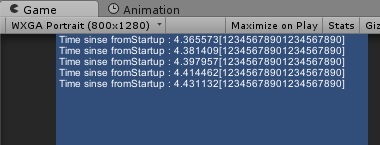
上記のプログラムを実行すると、ログが下記のように画面表示されます。


ゲーム開発者になるための Unity4 徹底ガイド プロが教える効果的なゲーム制作技法

[Unity]Rigidbody2Dで回転を抑止するには

Unityで画面上にRigidBodyを設定したGameObjectに対して、回転を抑制したい場合
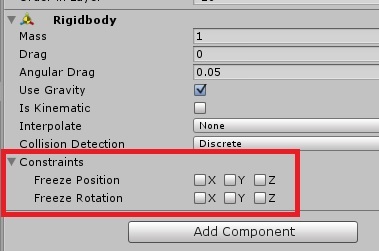
ConstraintsのFreeze Rotationにチェックを入れることで可能です。


ですが、RigidBody2Dには、Constraintsのパラメータがありません…
RigidBody2Dで回転を抑止するには、替わりにFixedAngleにチェックを入れればOKです。


これで、予期せぬ回転を防ぐことができます。

[Windows 8]システムバックアップをバッチで自動取得する

windows8には、コマンドラインから実行可能なwbadminというバックアッププログラムがあります。
wbadminを使用することで、起動ディスクのシステムバックアップを採取することができます。

下記のコマンドで、CドライブのバックアップをDドライブに採取できます。

wbadmin START BACKUP -include:C: -backupTarget:D:  -allCritical -vssFull -quiet


さらに複数世代バックアップ取りたい場合は、下記のようにするとよいです。

rem -----------------------------------------------------
rem CドライブのシステムバックアップをDドライブに保存する
rem バックアップ中のエラーに備え、3世代の履歴を管理
rem -----------------------------------------------------
 
rmdir /S /Q d:\WindowsImageBackup_2
move d:\WindowsImageBackup_1 d:\WindowsImageBackup_2
move d:\WindowsImageBackup   d:\WindowsImageBackup_1
wbadmin START BACKUP -include:C: -backupTarget:D:  -allCritical -vssFull -quiet


さらに、バッチ実行時のログが取りたい場合はこんな感じで…

rem -----------------------------------------------------
rem CドライブのシステムバックアップをDドライブに保存する
rem バックアップ中のエラーに備え、3世代の履歴を管理
rem -----------------------------------------------------
set BACKUP_LOG_FILE=d:\systembackup.log
 
date /t > %BACKUP_LOG_FILE%
time /t >> %BACKUP_LOG_FILE%
 
rmdir /S /Q d:\WindowsImageBackup_2                   >> %BACKUP_LOG_FILE%
move d:\WindowsImageBackup_1 d:\WindowsImageBackup_2  >> %BACKUP_LOG_FILE%
move d:\WindowsImageBackup   d:\WindowsImageBackup_1  >> %BACKUP_LOG_FILE%
wbadmin START BACKUP -include:C: -backupTarget:D:  -allCritical -vssFull -quiet >> %BACKUP_LOG_FILE%
 
date /t >> %BACKUP_LOG_FILE%
time /t >> %BACKUP_LOG_FILE%


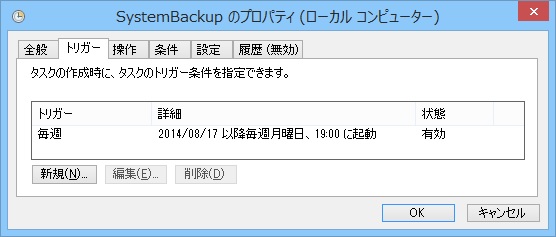
作成したバッチは、タスクスケジューラで自動実行させておくと便利です。

[VirtualBox]コマンドラインからVMを自動起動/停止させる

VBoxManage.exeコマンドによる、VMのバッチ操作コマンドです。

VMの一覧を出力

"C:\Program Files\Oracle\VirtualBox\VBoxManage.exe" list vms


"linux_ubuntu14.04" {5acb5178-6bf4-4dc5-bc08-4d00ff5dd4ec}
"linux_centos7.0" {33eb52b2-ecf4-4e05-b39c-e5a8a5456377}


VMを起動させる (2行になっていますが、実際は1行で入力します)

"C:\Program Files\Oracle\VirtualBox\VBoxManage.exe" 
startvm "linux_ubuntu14.04" --type headless


Waiting for VM "Win2kPro_Trac" to power on...
VM "linux_ubuntu14.04" has been successfully started.


起動中のVM一覧を取得

"C:\Program Files\Oracle\VirtualBox\VBoxManage.exe" list runningvms


"linux_ubuntu14.04" {5acb5178-6bf4-4dc5-bc08-4d00ff5dd4ec}


VMを停止(サスペンド)させる(2行になっていますが、実際は1行で入力します)

"C:\Program Files\Oracle\VirtualBox\VBoxManage.exe" 
controlvm "linux_ubuntu14.04"  savestate


0%...10%...20%...30%...40%...50%...60%...70%...80%...90%...100%

[VirtualBox]VBoxManage.exeコマンドのオプション一覧

VirtualBoxはGUIによる捜査以外に、VBoxManage.exeコマンドを使用することでコマンドラインからVMの起動・停止など管理業務をバッチ化することができます。

VBoxManage.exeのオプション一覧は下記の鳥です。

Oracle VM VirtualBox Command Line Management Interface Version 4.3.12
(C) 2005-2014 Oracle Corporation
All rights reserved.
 
Usage:
 
  VBoxManage [<general option>] <command>
 
 
General Options:
 
  [-v|--version]            print version number and exit
  [-q|--nologo]             suppress the logo
  [--settingspw <pw>]       provide the settings password
  [--settingspwfile <file>] provide a file containing the settings password
 
 
Commands:
 
  list [--long|-l]          vms|runningvms|ostypes|hostdvds|hostfloppies|
                            intnets|bridgedifs|hostonlyifs|natnets|dhcpservers|
                            hostinfo|hostcpuids|hddbackends|hdds|dvds|floppies|
                            usbhost|usbfilters|systemproperties|extpacks|
                            groups|webcams
 
  showvminfo                <uuid|vmname> [--details]
                            [--machinereadable]
  showvminfo                <uuid|vmname> --log <idx>
 
  registervm                <filename>
 
  unregistervm              <uuid|vmname> [--delete]
 
  createvm                  --name <name>
                            [--groups <group>, ...]
                            [--ostype <ostype>]
                            [--register]
                            [--basefolder <path>]
                            [--uuid <uuid>]
 
  modifyvm                  <uuid|vmname>
                            [--name <name>]
                            [--groups <group>, ...]
                            [--ostype <ostype>]
                            [--iconfile <filename>]
                            [--memory <memorysize in MB>]
                            [--pagefusion on|off]
                            [--vram <vramsize in MB>]
                            [--acpi on|off]
                            [--pciattach 03:04.0]
                            [--pciattach 03:04.0@02:01.0]
                            [--pcidetach 03:04.0]
                            [--ioapic on|off]
                            [--hpet on|off]
                            [--triplefaultreset on|off]
                            [--hwvirtex on|off]
                            [--nestedpaging on|off]
                            [--largepages on|off]
                            [--vtxvpid on|off]
                            [--vtxux on|off]
                            [--pae on|off]
                            [--longmode on|off]
                            [--synthcpu on|off]
                            [--cpuidset <leaf> <eax> <ebx> <ecx> <edx>]
                            [--cpuidremove <leaf>]
                            [--cpuidremoveall]
                            [--hardwareuuid <uuid>]
                            [--cpus <number>]
                            [--cpuhotplug on|off]
                            [--plugcpu <id>]
                            [--unplugcpu <id>]
                            [--cpuexecutioncap <1-100>]
                            [--rtcuseutc on|off]
                            [--graphicscontroller none|vboxvga|vmsvga]
                            [--monitorcount <number>]
                            [--accelerate3d on|off]
                            [--accelerate2dvideo on|off]
                            [--firmware bios|efi|efi32|efi64]
                            [--chipset ich9|piix3]
                            [--bioslogofadein on|off]
                            [--bioslogofadeout on|off]
                            [--bioslogodisplaytime <msec>]
                            [--bioslogoimagepath <imagepath>]
                            [--biosbootmenu disabled|menuonly|messageandmenu]
                            [--biossystemtimeoffset <msec>]
                            [--biospxedebug on|off]
                            [--boot<1-4> none|floppy|dvd|disk|net>]
                            [--nic<1-N> none|null|nat|bridged|intnet|hostonly|
                                        generic|natnetwork]
                            [--nictype<1-N> Am79C970A|Am79C973|
                                            82540EM|82543GC|82545EM|
                                            virtio]
                            [--cableconnected<1-N> on|off]
                            [--nictrace<1-N> on|off]
                            [--nictracefile<1-N> <filename>]
                            [--nicproperty<1-N> name=[value]]
                            [--nicspeed<1-N> <kbps>]
                            [--nicbootprio<1-N> <priority>]
                            [--nicpromisc<1-N> deny|allow-vms|allow-all]
                            [--nicbandwidthgroup<1-N> none|<name>]
                            [--bridgeadapter<1-N> none|<devicename>]
                            [--hostonlyadapter<1-N> none|<devicename>]
                            [--intnet<1-N> <network name>]
                            [--nat-network<1-N> <network name>]
                            [--nicgenericdrv<1-N> <driver>
                            [--natnet<1-N> <network>|default]
                            [--natsettings<1-N> [<mtu>],[<socksnd>],
                                                [<sockrcv>],[<tcpsnd>],
                                                [<tcprcv>]]
                            [--natpf<1-N> [<rulename>],tcp|udp,[<hostip>],
                                          <hostport>,[<guestip>],<guestport>]
                            [--natpf<1-N> delete <rulename>]
                            [--nattftpprefix<1-N> <prefix>]
                            [--nattftpfile<1-N> <file>]
                            [--nattftpserver<1-N> <ip>]
                            [--natbindip<1-N> <ip>
                            [--natdnspassdomain<1-N> on|off]
                            [--natdnsproxy<1-N> on|off]
                            [--natdnshostresolver<1-N> on|off]
                            [--nataliasmode<1-N> default|[log],[proxyonly],
                                                         [sameports]]
                            [--macaddress<1-N> auto|<mac>]
                            [--mouse ps2|usb|usbtablet|usbmultitouch]
                            [--keyboard ps2|usb
                            [--uart<1-N> off|<I/O base> <IRQ>]
                            [--uartmode<1-N> disconnected|
                                             server <pipe>|
                                             client <pipe>|
                                             file <file>|
                                             <devicename>]
                            [--lpt<1-N> off|<I/O base> <IRQ>]
                            [--lptmode<1-N> <devicename>]
                            [--guestmemoryballoon <balloonsize in MB>]
                            [--audio none|null|dsound]
                            [--audiocontroller ac97|hda|sb16]
                            [--clipboard disabled|hosttoguest|guesttohost|
                                         bidirectional]
                            [--draganddrop disabled|hosttoguest
                            [--vrde on|off]
                            [--vrdeextpack default|<name>
                            [--vrdeproperty <name=[value]>]
                            [--vrdeport <hostport>]
                            [--vrdeaddress <hostip>]
                            [--vrdeauthtype null|external|guest]
                            [--vrdeauthlibrary default|<name>
                            [--vrdemulticon on|off]
                            [--vrdereusecon on|off]
                            [--vrdevideochannel on|off]
                            [--vrdevideochannelquality <percent>]
                            [--usb on|off]
                            [--usbehci on|off]
                            [--snapshotfolder default|<path>]
                            [--teleporter on|off]
                            [--teleporterport <port>]
                            [--teleporteraddress <address|empty>
                            [--teleporterpassword <password>]
                            [--teleporterpasswordfile <file>|stdin]
                            [--tracing-enabled on|off]
                            [--tracing-config <config-string>]
                            [--tracing-allow-vm-access on|off]
                            [--usbcardreader on|off]
                            [--autostart-enabled on|off]
                            [--autostart-delay <seconds>]
                            [--vcpenabled on|off]
                            [--vcpscreens [<display>],...
                            [--vcpfile <filename>]
                            [--vcpwidth <width>]
                            [--vcpheight <height>]
                            [--vcprate <rate>]
                            [--vcpfps <fps>]
                            [--defaultfrontend default|<name>]
 
  clonevm                   <uuid|vmname>
                            [--snapshot <uuid>|<name>]
                            [--mode machine|machineandchildren|all]
                            [--options link|keepallmacs|keepnatmacs|
                                       keepdisknames]
                            [--name <name>]
                            [--groups <group>, ...]
                            [--basefolder <basefolder>]
                            [--uuid <uuid>]
                            [--register]
 
  import                    <ovfname/ovaname>
                            [--dry-run|-n]
                            [--options keepallmacs|keepnatmacs]
                            [more options]
                            (run with -n to have options displayed
                             for a particular OVF)
 
  export                    <machines> --output|-o <name>.<ovf/ova>
                            [--legacy09|--ovf09|--ovf10|--ovf20]
                            [--manifest]
                            [--iso]
                            [--options manifest|iso|nomacs|nomacsbutnat]
                            [--vsys <number of virtual system>]
                                    [--product <product name>]
                                    [--producturl <product url>]
                                    [--vendor <vendor name>]
                                    [--vendorurl <vendor url>]
                                    [--version <version info>]
                                    [--description <description info>]
                                    [--eula <license text>]
                                    [--eulafile <filename>]
 
  startvm                   <uuid|vmname>...
                            [--type gui|sdl|headless]
 
  controlvm                 <uuid|vmname>
                            pause|resume|reset|poweroff|savestate|
                            acpipowerbutton|acpisleepbutton|
                            keyboardputscancode <hex> [<hex> ...]|
                            setlinkstate<1-N> on|off |
                            nic<1-N> null|nat|bridged|intnet|hostonly|generic|
                                     natnetwork [<devicename>] |
                            nictrace<1-N> on|off |
                            nictracefile<1-N> <filename> |
                            nicproperty<1-N> name=[value] |
                            nicpromisc<1-N> deny|allow-vms|allow-all |
                            natpf<1-N> [<rulename>],tcp|udp,[<hostip>],
                                        <hostport>,[<guestip>],<guestport> |
                            natpf<1-N> delete <rulename> |
                            guestmemoryballoon <balloonsize in MB> |
                            usbattach <uuid>|<address> |
                            usbdetach <uuid>|<address> |
                            clipboard disabled|hosttoguest|guesttohost|
                                      bidirectional |
                            draganddrop disabled|hosttoguest |
                            vrde on|off |
                            vrdeport <port> |
                            vrdeproperty <name=[value]> |
                            vrdevideochannelquality <percent> |
                            setvideomodehint <xres> <yres> <bpp>
                                            [[<display>] [<enabled:yes|no> |
                                              [<xorigin> <yorigin>]]] |
                            screenshotpng <file> [display] |
                            vcpenabled on|off |
                            vcpscreens all|none|<screen>,[<screen>...] |
                            setcredentials <username>
                                           --passwordfile <file> | <password>
                                           <domain>
                                           [--allowlocallogon <yes|no>] |
                            teleport --host <name> --port <port>
                                     [--maxdowntime <msec>]
                                     [--passwordfile <file> |
                                      --password <password>] |
                            plugcpu <id> |
                            unplugcpu <id> |
                            cpuexecutioncap <1-100>
                            webcam <attach [path [settings]]> | <detach [path]> | <list>
 
  discardstate              <uuid|vmname>
 
  adoptstate                <uuid|vmname> <state_file>
 
  snapshot                  <uuid|vmname>
                            take <name> [--description <desc>] [--live] |
                            delete <uuid|snapname> |
                            restore <uuid|snapname> |
                            restorecurrent |
                            edit <uuid|snapname>|--current
                                 [--name <name>]
                                 [--description <desc>] |
                            list [--details|--machinereadable]
                            showvminfo <uuid|snapname>
 
  closemedium               disk|dvd|floppy <uuid|filename>
                            [--delete]
 
  storageattach             <uuid|vmname>
                            --storagectl <name>
                            [--port <number>]
                            [--device <number>]
                            [--type dvddrive|hdd|fdd]
                            [--medium none|emptydrive|additions|
                                      <uuid|filename>|host:<drive>|iscsi]
                            [--mtype normal|writethrough|immutable|shareable|
                                     readonly|multiattach]
                            [--comment <text>]
                            [--setuuid <uuid>]
                            [--setparentuuid <uuid>]
                            [--passthrough on|off]
                            [--tempeject on|off]
                            [--nonrotational on|off]
                            [--discard on|off]
                            [--bandwidthgroup <name>]
                            [--forceunmount]
                            [--server <name>|<ip>]
                            [--target <target>]
                            [--tport <port>]
                            [--lun <lun>]
                            [--encodedlun <lun>]
                            [--username <username>]
                            [--password <password>]
                            [--initiator <initiator>]
                            [--intnet]
 
  storagectl                <uuid|vmname>
                            --name <name>
                            [--add ide|sata|scsi|floppy|sas]
                            [--controller LSILogic|LSILogicSAS|BusLogic|
                                          IntelAHCI|PIIX3|PIIX4|ICH6|I82078]
                            [--portcount <1-30>]
                            [--hostiocache on|off]
                            [--bootable on|off]
                            [--remove]
 
  bandwidthctl              <uuid|vmname>
                            add <name> --type disk|network
                                --limit <megabytes per second>[k|m|g|K|M|G] |
                            set <name>
                                --limit <megabytes per second>[k|m|g|K|M|G] |
                            remove <name> |
                            list [--machinereadable]
                            (limit units: k=kilobit, m=megabit, g=gigabit,
                                          K=kilobyte, M=megabyte, G=gigabyte)
 
  showhdinfo                <uuid|filename>
 
  createhd                  --filename <filename>
                            [--size <megabytes>|--sizebyte <bytes>]
                            [--diffparent <uuid>|<filename>
                            [--format VDI|VMDK|VHD] (default: VDI)
                            [--variant Standard,Fixed,Split2G,Stream,ESX]
 
  modifyhd                  <uuid|filename>
                            [--type normal|writethrough|immutable|shareable|
                                    readonly|multiattach]
                            [--autoreset on|off]
                            [--property <name=[value]>]
                            [--compact]
                            [--resize <megabytes>|--resizebyte <bytes>]
 
  clonehd                   <uuid|inputfile> <uuid|outputfile>
                            [--format VDI|VMDK|VHD|RAW|<other>]
                            [--variant Standard,Fixed,Split2G,Stream,ESX]
                            [--existing]
 
  convertfromraw            <filename> <outputfile>
                            [--format VDI|VMDK|VHD]
                            [--variant Standard,Fixed,Split2G,Stream,ESX]
                            [--uuid <uuid>]
  convertfromraw            stdin <outputfile> <bytes>
                            [--format VDI|VMDK|VHD]
                            [--variant Standard,Fixed,Split2G,Stream,ESX]
                            [--uuid <uuid>]
 
  getextradata              global|<uuid|vmname>
                            <key>|enumerate
 
  setextradata              global|<uuid|vmname>
                            <key>
                            [<value>] (no value deletes key)
 
  setproperty               machinefolder default|<folder> |
                            hwvirtexclusive on|off |
                            vrdeauthlibrary default|<library> |
                            websrvauthlibrary default|null|<library> |
                            vrdeextpack null|<library> |
                            autostartdbpath null|<folder> |
                            loghistorycount <value>
                            defaultfrontend default|<name>
 
  usbfilter                 add <index,0-N>
                            --target <uuid|vmname>|global
                            --name <string>
                            --action ignore|hold (global filters only)
                            [--active yes|no] (yes)
                            [--vendorid <XXXX>] (null)
                            [--productid <XXXX>] (null)
                            [--revision <IIFF>] (null)
                            [--manufacturer <string>] (null)
                            [--product <string>] (null)
                            [--remote yes|no] (null, VM filters only)
                            [--serialnumber <string>] (null)
                            [--maskedinterfaces <XXXXXXXX>]
 
  usbfilter                 modify <index,0-N>
                            --target <uuid|vmname>|global
                            [--name <string>]
                            [--action ignore|hold] (global filters only)
                            [--active yes|no]
                            [--vendorid <XXXX>|""]
                            [--productid <XXXX>|""]
                            [--revision <IIFF>|""]
                            [--manufacturer <string>|""]
                            [--product <string>|""]
                            [--remote yes|no] (null, VM filters only)
                            [--serialnumber <string>|""]
                            [--maskedinterfaces <XXXXXXXX>]
 
  usbfilter                 remove <index,0-N>
                            --target <uuid|vmname>|global
 
  sharedfolder              add <uuid|vmname>
                            --name <name> --hostpath <hostpath>
                            [--transient] [--readonly] [--automount]
 
  sharedfolder              remove <uuid|vmname>
                            --name <name> [--transient]
 
  guestproperty             get <uuid|vmname>
                            <property> [--verbose]
 
  guestproperty             set <uuid|vmname>
                            <property> [<value> [--flags <flags>]]
 
  guestproperty             delete|unset <uuid|vmname>
                            <property>
 
  guestproperty             enumerate <uuid|vmname>
                            [--patterns <patterns>]
 
  guestproperty             wait <uuid|vmname> <patterns>
                            [--timeout <msec>] [--fail-on-timeout]
 
  guestcontrol              <uuid|vmname>
 
                              exec[ute]
                              --image <path to program> --username <name>
                              [--passwordfile <file> | --password <password>]
                              [--domain <domain>] [--verbose] [--timeout <msec>]
                              [--environment "<NAME>=<VALUE> [<NAME>=<VALUE>]"]
                              [--wait-exit] [--wait-stdout] [--wait-stderr]
                              [--dos2unix] [--unix2dos]
                              [-- [<argument1>] ... [<argumentN>]]
 
                              copyfrom
                              <guest source> <host dest> --username <name>
                              [--passwordfile <file> | --password <password>]
                              [--domain <domain>] [--verbose]
                              [--dryrun] [--follow] [--recursive]
 
                              copyto|cp
                              <host source> <guest dest> --username <name>
                              [--passwordfile <file> | --password <password>]
                              [--domain <domain>] [--verbose]
                              [--dryrun] [--follow] [--recursive]
 
                              createdir[ectory]|mkdir|md
                              <guest directory>... --username <name>
                              [--passwordfile <file> | --password <password>]
                              [--domain <domain>] [--verbose]
                              [--parents] [--mode <mode>]
 
                              removedir[ectory]|rmdir
                              <guest directory>... --username <name>
                              [--passwordfile <file> | --password <password>]
                              [--domain <domain>] [--verbose]
                              [--recursive|-R|-r]
 
                              removefile|rm
                              <guest file>... --username <name>
                              [--passwordfile <file> | --password <password>]
                              [--domain <domain>] [--verbose]
 
                              ren[ame]|mv
                              <source>... <dest> --username <name>
                              [--passwordfile <file> | --password <password>]
                              [--domain <domain>] [--verbose]
 
                              createtemp[orary]|mktemp
                              <template> --username <name>
                              [--passwordfile <file> | --password <password>]
                              [--directory] [--secure] [--tmpdir <directory>]
                              [--domain <domain>] [--mode <mode>] [--verbose]
 
                              list <all|sessions|processes|files> [--verbose]
 
                              process kill --session-id <ID>
                                           | --session-name <name or pattern>
                                           [--verbose]
                                           <PID> ... <PID n>
 
                              [p[s]]kill --session-id <ID>
                                         | --session-name <name or pattern>
                                         [--verbose]
                                         <PID> ... <PID n>
 
                              session close  --session-id <ID>
                                           | --session-name <name or pattern>
                                           | --all
                                           [--verbose]
 
                              stat
                              <file>... --username <name>
                              [--passwordfile <file> | --password <password>]
                              [--domain <domain>] [--verbose]
 
                              updateadditions
                              [--source <guest additions .ISO>] [--verbose]
                              [--wait-start]
                              [-- [<argument1>] ... [<argumentN>]]
 
                              watch [--verbose]
 
  debugvm                   <uuid|vmname>
                            dumpguestcore --filename <name> |
                            info <item> [args] |
                            injectnmi |
                            log [--release|--debug] <settings> ...|
                            logdest [--release|--debug] <settings> ...|
                            logflags [--release|--debug] <settings> ...|
                            osdetect |
                            osinfo |
                            getregisters [--cpu <id>] <reg>|all ... |
                            setregisters [--cpu <id>] <reg>=<value> ... |
                            show [--human-readable|--sh-export|--sh-eval|
                                  --cmd-set] 
                                <logdbg-settings|logrel-settings>
                                [[opt] what ...] |
                            statistics [--reset] [--pattern <pattern>]
                            [--descriptions]
 
  metrics                   list [*|host|<vmname> [<metric_list>]]
                                                 (comma-separated)
 
  metrics                   setup
                            [--period <seconds>] (default: 1)
                            [--samples <count>] (default: 1)
                            [--list]
                            [*|host|<vmname> [<metric_list>]]
 
  metrics                   query [*|host|<vmname> [<metric_list>]]
 
  metrics                   enable
                            [--list]
                            [*|host|<vmname> [<metric_list>]]
 
  metrics                   disable
                            [--list]
                            [*|host|<vmname> [<metric_list>]]
 
  metrics                   collect
                            [--period <seconds>] (default: 1)
                            [--samples <count>] (default: 1)
                            [--list]
                            [--detach]
                            [*|host|<vmname> [<metric_list>]]
 
  natnetwork                add --netname <name>
                            --network <network>
                            [--enable|--disable]
                            [--dhcp on|off]
                            [--port-forward-4 <rule>]
                            [--loopback-4 <rule>]
                            [--ipv6 on|off]
                            [--port-forward-6 <rule>]
                            [--loopback-6 <rule>]
 
  natnetwork                remove --netname <name>
 
  natnetwork                modify --netname <name>
                            [--network <network>]
                            [--enable|--disable]
                            [--dhcp on|off]
                            [--port-forward-4 <rule>]
                            [--loopback-4 <rule>]
                            [--ipv6 on|off]
                            [--port-forward-6 <rule>]
                            [--loopback-6 <rule>]
 
  natnetwork                start --netname <name>
 
  natnetwork                stop --netname <name>
 
  hostonlyif                ipconfig <name>
                            [--dhcp |
                            --ip<ipv4> [--netmask<ipv4> (def: 255.255.255.0)] |
                            --ipv6<ipv6> [--netmasklengthv6<length> (def: 64)]]
                            create |
                            remove <name>
 
  dhcpserver                add|modify --netname <network_name> |
                                       --ifname <hostonly_if_name>
                            [--ip <ip_address>
                            --netmask <network_mask>
                            --lowerip <lower_ip>
                            --upperip <upper_ip>]
                            [--enable | --disable]
 
  dhcpserver                remove --netname <network_name> |
                                   --ifname <hostonly_if_name>
 
  extpack                   install [--replace] <tarball> |
                            uninstall [--force] <name> |
                            cleanup

[VirtualBox]VM起動時にsupR3HardenedWinReSpawnエラーが出る場合

VirtualBoxでVMを起動したとき、下記のエラーダイアログが表示され、起動しない場合があります。

この現象は、バージョン4.3.14で発生する不具合のようです。


参考:VirtualBox 4.3.14 can’t start VMs on certain Windows hosts

Both new and existing VMs cannot be started with VirtualBox 4.3.14 under Win 8.1 x64. 
Double-clicking on a stopped VM in the GUI gives a popup containing CLI arguments 
and a message that it failed. Vagrant is broken too. 
 
Restarting the system does not fix the issue. 
Uninstalling and reinstalling 4.3.14 does not fix the issue. 
 
The only fix is to uninstall and reinstall 4.3.12.


作成済みVM、新規で作ったVMがWin 8.1 x64環境のVirtualBox 4.3.14で起動しません。
VMをダブルクリックして起動しようとすると、コマンドライン引数が表示されたダイアログが出て、起動しません。
 
OSの再起動や、VirtualBoxの再起動を行っても解消せず、4.3.12を使用することでしか解決しませんでした。


現状はTicket #13187として不具合登録されており、解決方法は古いバージョンの4.3.12.を使うしかなさそうです。

過去バージョンのVirtualBoxは、下記のページから入手可能です。
Download VirtualBox (Old Builds)


※ただし、VirtualBox 4.3.14 未満は、既知のセキュリティホールがあるため、外部公開するVM運用はしない方が良いです。
JVNDB-2014-003437:Oracle Virtualization の Oracle VM VirtualBox における Core に関する脆弱性

[Windows8]OSインストール中にHDDをGPT形式に変更する

OSインストールの途中で、Shift+F10を押します。
すると、コマンドプロンプトのウィンドウが表示されます。
(言語の選択のときは反応しないっぽい。パーティションの選択画面だと確実に表示される)


diskpartコマンドで、パーティションのモードを変えます

diskpart
list disk
select disk ?   // ?は、list diskで表示されたディスク番号
clean
convert gpt     
exit


mbr→gptではなく、mbrにしたい場合は”convert mbr”にします。


いったんPCを再起動します。
これで、HDDがGPTパーティションと認識されてインストールできます。

AWSのt1.microでnode.jsを使用してみる

今回は、AWSでnode.jsを使用してみます。


node.jsのインストール

必要なソフトウェアをgitからインストールしたいので、まずはgitをインストールします。
コマンドは”sudo yum install git -y”で、最後にComplete!になればOKです。

sudo yum install git -y
 
 
Loaded plugins: priorities, update-motd, upgrade-helper
amzn-main/latest                                                  | 2.1 kB     00:00
amzn-updates/latest                                               | 2.3 kB     00:00
Resolving Dependencies
--> Running transaction check
---> Package git.x86_64 0:1.8.3.1-2.37.amzn1 will be installed
--> Processing Dependency: perl-Git = 1.8.3.1-2.37.amzn1 for package: git-1.8.3.1-2.37.amzn1.x86_64
--> Processing Dependency: perl(Term::ReadKey) for package: git-1.8.3.1-2.37.amzn1.x86_64
--> Processing Dependency: perl(Git) for package: git-1.8.3.1-2.37.amzn1.x86_64
--> Processing Dependency: perl(Error) for package: git-1.8.3.1-2.37.amzn1.x86_64
--> Running transaction check
---> Package perl-Error.noarch 1:0.17020-1.7.amzn1 will be installed
---> Package perl-Git.noarch 0:1.8.3.1-2.37.amzn1 will be installed
---> Package perl-TermReadKey.x86_64 0:2.30-18.8.amzn1 will be installed
--> Finished Dependency Resolution
 
Dependencies Resolved
 
==================================================================================
 Package                    Arch       Version                  Repository   Size
==================================================================================
Installing:
 git                        x86_64     1.8.3.1-2.37.amzn1       amzn-main   7.8 M
Installing for dependencies:
 perl-Error                 noarch     1:0.17020-1.7.amzn1      amzn-main    32 k
 perl-Git                   noarch     1.8.3.1-2.37.amzn1       amzn-main    55 k
 perl-TermReadKey           x86_64     2.30-18.8.amzn1          amzn-main    32 k
 
Transaction Summary
==================================================================================
Install  1 Package (+3 Dependent packages)
 
Total download size: 7.9 M
Installed size: 19 M
Downloading packages:
(1/4): git-1.8.3.1-2.37.amzn1.x86_64.rpm                      | 7.8 MB     00:00 
(2/4): perl-Error-0.17020-1.7.amzn1.noarch.rpm                |  32 kB     00:00 
(3/4): perl-Git-1.8.3.1-2.37.amzn1.noarch.rpm                 |  55 kB     00:00 
(4/4): perl-TermReadKey-2.30-18.8.amzn1.x86_64.rpm            |  32 kB     00:00 
---------------------------------------------------------------------------------
Total                                                6.8 MB/s | 7.9 MB  00:00:01 
Running transaction check
Running transaction test
Transaction test succeeded
Running transaction
  Installing : 1:perl-Error-0.17020-1.7.amzn1.noarch                      1/4 
  Installing : perl-TermReadKey-2.30-18.8.amzn1.x86_64                    2/4 
  Installing : git-1.8.3.1-2.37.amzn1.x86_64                              3/4 
  Installing : perl-Git-1.8.3.1-2.37.amzn1.noarch                         4/4 
  Verifying  : perl-Git-1.8.3.1-2.37.amzn1.noarch                         1/4 
  Verifying  : 1:perl-Error-0.17020-1.7.amzn1.noarch                      2/4 
  Verifying  : git-1.8.3.1-2.37.amzn1.x86_64                              3/4 
  Verifying  : perl-TermReadKey-2.30-18.8.amzn1.x86_64                    4/4 
 
Installed:
  git.x86_64 0:1.8.3.1-2.37.amzn1                       
 
Dependency Installed:
  perl-Error.noarch 1:0.17020-1.7.amzn1               perl-Git.noarch 0:1.8.3.1-2.37.amzn1
  perl-TermReadKey.x86_64 0:2.30-18.8.amzn1          
 
Complete!


次にnode.jsをインストールしたいところですが、その前にnvm(Node Version Manager)を入れます。
nvmを経由でnode.jsを利用することで、node.jsのバージョン切り替えが容易になります。

git clone git://github.com/creationix/nvm.git ~/.nvm
 
Cloning into '.nvm'...
remote: Counting objects: 1541, done.                   
remote: Compressing objects: 100% (762/762), done.      
remote: Total 1541 (delta 789), reused 1502 (delta 762) 
Receiving objects: 100% (1541/1541), 281.79 KiB | 156.00 KiB/s, done.
Resolving deltas: 100% (789/789), done.


インストールが終わったら,”source ~/.nvm/nvm.sh”で、nvmを利用可能にします。
–versionオプションでバージョンのチェックが可能です。

source ~/.nvm/nvm.sh
 
[ec2-user@ip-172-xx-xx-xx .nvm]$ nvm --version
0.10.0


nvmを使用して、指定したバージョンのnode.jsをインストールします。

[ec2-user@ip-172-xx-xx-xx .nvm]$ nvm install 0.10.0
######################################################################## 100.0%
Now using node v0.10.0


念のためにnode.jsのバージョンを確認します
ちなみに2回目以降はinstallしなくても”node use 0.10.0″で利用できます。

[ec2-user@ip-172-xx-xx-xx .nvm]$ node --version
v0.10.0


動作確認用のプログラムを適当に作成します。

[ec2-user@ip-172-xx-xx-xx ~]$ cat test.js
var http = require('http');
var onRequest = function(req,res){
        console.log( "request received." );
        res.end('Hello world' )
};
 
var app = http.createServer( onRequest ).listen(3000);
console.log( "start server" );


node.jsで作ったプログラムを起動します

[ec2-user@ip-172-xx-xx-xx ~]$ node test.js
start server


ブラウザからアクセスするために,ポートを開放する

上記のプログラムは、3000番のポートで接続を待ち受けますが、aws側はデフォルトではすべてのポートが閉じられています。
ですのでポート開放の作業が必要となります。

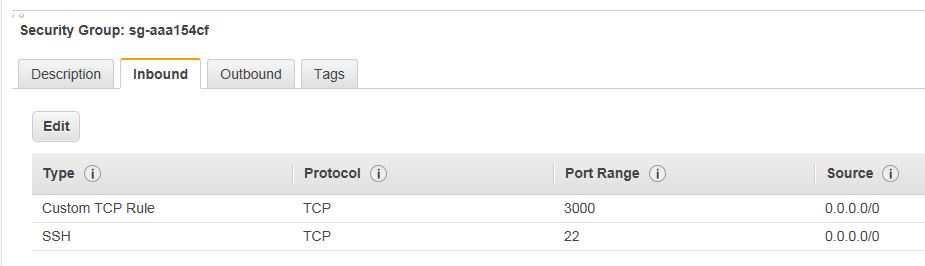
EC2の起動インスタンス一覧を開き、右端にあるSecurity Groupsを選択します。
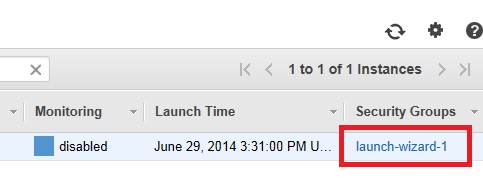


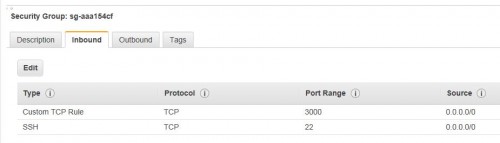
inboundに3000番ポートを追加します。



以下のように追加されていればOKです。


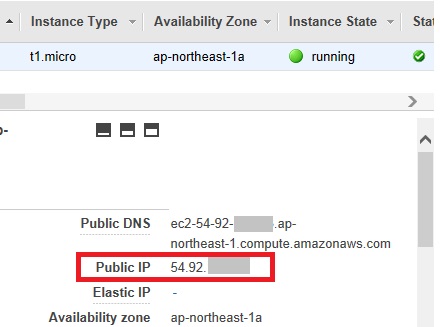
接続先のIPアドレスは、EC2 Dashboardに記載されたPublic IPで確認できます。


動作確認

ブラウザから確認したアドレスにアクセスすると、プログラムの実行結果を確認できます。
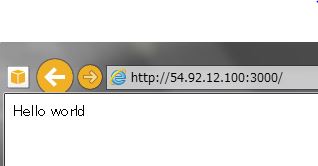


作業の途中で行ったnvmコマンドはログアウトすると忘れてしまうので、
ログインしなおした場合は、下記のコマンドで再度プログラムを実行できます。

~/.nvm/nvm.sh
nvm use 0.10.0
node test.js

WRH-300シリーズ 設定画面へのアクセス方法

備忘録としてのメモ。


管理画面へは、下記の4つのいずれかで入れるはず。

http://wrh-300x.setup/

http://192.168.2.251/

http://192.168.2.1/

http://192.168.xxx.251/ (xxxはルータで設定したネットワーク)


アクセス後、認証画面が表示されます。
デフォルトのID/Passwordは、admin/adminです。


mosatsu_Page_wrh-300x

GMOのお名前.comでサンライズ申請期間中の手続きフロー

手続きの流れは以下の通り
オークションや、先行登録で負けた場合でも申請料金は取られっぱなしになる事に注意。
(登録料金は)

ちなみに、.nagoya/.tokyoドメインのサンライズ登録(商標を持っている人向け)の申請料金は15,550円なので、結構高い。サンライズ登録後のランドラッシュ登録(オークション形式)だと、申請料金は5,400円になる。

─────────────────────────────────── 
■新ドメイン先行登録(商標あり/サンライズ申請) お手続きの流れ
─────────────────────────────────── 
【概要】
(1)申請受付 
(2)料金のお支払い 
(3)確認機関の審査 
(4)先行登録(商標あり/サンライズ申請)受付終了
(5)オークション(該当者のみ) 
(6)登録完了 
 
【詳細】
(1)申請受付 
  新ドメインの申請は一旦保留にて受付いたします。当メールに申請 
  情報が記載されておりますのでご確認ください。 
 
(2)料金のお支払い 
  新ドメイン先行登録(商標あり/サンライズ申請)では、登録料金及び
 申請料金を請求させていただきます。
 
  ■クレジットカードの場合 
  ドメイン名の申請が受付された後に、クレジットカードへ課金いたします。
  課金完了ののち、下記件名のメールを送信いたします。
 
  ・[お名前.com]「ドメイン登録 料金ご請求/領収明細」 
 
  ■銀行振込み支払いの場合 
  お支払いは下記件名のメールをご確認ください。 
  
  ・[お名前.com]ドメイン登録 料金ご請求明細 
 
  お支払い後の本申請はいかなる場合でもキャンセル・情報修正することは
  できません。また、ドメインが登録できなかった場合、
  (オークションで落札できなかった場合も含む)申請料金は返金されません。
  登録料金のみの返金となりますのであらかじめご了承ください。 
 
(3)確認機関の審査 
  申請後、確認機関で申請に対して審査が行われます。確認機関の審査に 
  より申請内容に不備が確認された場合は、先行登録(商標あり/サンライズ申請)
  期間終了前もしくは終了後にその旨をご連絡いたします。 
 
  審査が受理され、同一ドメインに対して複数申請が無かった場合は、 
  先行登録(商標あり/サンライズ申請)期間終了後にドメインの登録処理が 
  行われます。 
 
(4)先行登録(商標あり/サンライズ申請)受付終了  
  以下URLにて詳細の終了日をご確認ください。
  https://www.onamae.com/newgtld/xxxxx/
 
(5)オークション(該当者のみ) 
  同一ドメイン名に対して複数申請があった場合には先行登録(商標あり/
  サンライズ申請) の申請期間終了後にオークションが行われます。 
 
  詳細につきましては、オークション機関からのメールをご確認ください。 
 
  ※英語のメールとなりますので、あらかじめ迷惑メールフィルターの設定 
   などをご確認いただき、受信漏れのないようご注意ください。 
 
(6)登録完了 
  下記件名のメールを送信いたします。 
 
  ・[お名前.com]ドメイン登録 完了通知 
 
  上記メールをもちましてお手続きが完了となります。ドメインNaviへ
  ログインし、ドメインが表示されていることをご確認ください。 
 
(7)本申請に関する各種ご連絡について 
 ・お名前.comからのご連絡は、お名前.com会員様へメールにてご案内 
  いたします。かならずご登録のメールアドレスをご確認ください。 
 ・商標権の確認、またはオークションに関しては、ドメイン登録者、 
  もしくは管理担当者宛に直接英語のメールが送信されることがあり
   ます。あらかじめ迷惑メールフィルターの設定などをご確認いただ
  き、受信漏れのないようご注意ください。


一旦申請すると、以下の様な形で保留されている通知が来る。

お名前.comをご利用いただき、まことにありがとうございます。
 
下記ドメイン名の登録申請を保留にて受付いたしました。
処理結果、または必要なお知らせを改めてメールにて通知いたしますので
今しばらくお待ちください。
 
※本メールにてドメイン取得を必ず保証するものではございません。
 下記件名のメールをもって登録完了のご案内とさせていただいております。
 件名:[お名前.com]ドメイン登録完了通知
 
[お申込みドメイン名]
ドメイン名.................:xxxxx.yyyyy
申請日.....................:2014年01月01日
申請種別...................:ドメイン登録
登録年数...................:1年
Whois情報公開代行..........:無
自動更新...................:無
 
ドメイン名.................:xxxxx.yyyyy
申請日.....................:2014年01月01日
申請種別...................:.yyyyy ランドラッシュ申請

Samsung SSD 840と840EVOの比較

Samsung SSD 840シリーズは、Samsung SSD 840とその後継のSamsung SSD 840 EVOが有る。


TurboWrite

容量の一部をMLCではなくTLCとして書き込むことでWriteを高速化する。
TLCにとりあえずかかれた情報は、後でアイドル状態のときに本来の場所に書き込まれる。
(一時的なバッファとして使用)
バッファのサイズは120,250GBモデルだと3GB確保される。


RAPID Mode

メインメモリをキャッシュに使う事で高速化する。
専用ソフトのMagician 4.2をインストールする必要がある。
リードが速くなる。


管理ツール:Magician

Samsung Magician Softwareは他に下記の機能がある。
性能監視
SSD自体の設定変更
ファームアップデート
SecureErase
TBW(Total Bytes Written:現在までの総書込量)
TRIM機能


価格

2014/03現在、500GBモデルが30,000、250GBモデルが16,000程度で購入可能。
Amazonの最新はこちらより確認できます。


その他情報


4gamer.net
Samsung SSD 840 EVO TLC採用SSDの第2弾は何がどう速くなったのかを明らかにする
http://www.4gamer.net/games/999/G999902/20130724099/

平澤寿康の周辺機器レビュー
Samsung「Samsung SSD 840 EVO」
~疑似SLCモードのバッファを用意し書き込み性能を向上
http://pc.watch.impress.co.jp/docs/column/hirasawa/20130726_609102.html

[C#]TextBoxにファイルをドラッグ&ドロップして、ファイル名入力させる

ツールを作っていると、アプリ内でファイル名を入力する状況がよく発生します。
この際、現在Explorer等で表示しているファイルをドロップすることで、ファイル名を指定できると、操作性が格段にアップします。

今回は、ドラッグ&ドロップでファイル名を指定できるようにします。


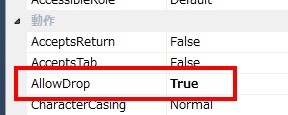
まずFormにTextBoxを貼り付け、ArrowDropプロパティをtrueにします。


次に、下記のコードを追加します。

private void TextBox_DragEnter( object sender, DragEventArgs e ) {
	//ファイルがドラッグされている場合、カーソルを変更する
	if (e.Data.GetDataPresent(DataFormats.FileDrop)) {
		e.Effect = DragDropEffects.Copy;
	}
}
 
private void TextBox_DragDrop( object sender, DragEventArgs e ) {
	//ドロップされたファイルの一覧を取得
	string[] fileName = (string[]) e.Data.GetData(DataFormats.FileDrop, false);
	if ( fileName.Length <= 0 ) {
		return;
	}
 
	// ドロップ先がTextBoxであるかチェック
	TextBox txtTarget = sender as TextBox;
	if ( txtTarget == null ) {
		return;
	}
 
	//TextBoxの内容をファイル名に変更
	txtTarget.Text = fileName[0];
}


TextBoxのDragEnterとDragDropのハンドラを、先ほど追加したメソッドに割り当てます。


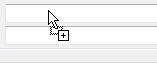
これで、ファイルをドラッグすると、下記のようにカーソルが”+”付きに変わり…


ドロップするとファイル名が表示されます。


先ほど用意したTextBox_DragDropメソッドはファイル名の出力先をsenderで決定しているため、複数のファイル名入力欄が有る場合でも、メソッドを複数用意することなく対応する事が可能です。

[WinShot]ファイル名の先頭に日付を入れる

スクリーンキャプチャソフトのWinShotでファイル名の先頭に日付を入れる方法です。


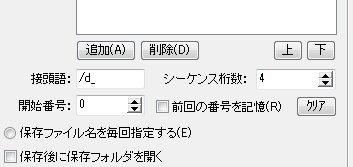
環境設定の接頭語に”/d”と入力します。


例えば上記のように接頭語を”/d_”とし、シーケンスを4桁にすると、「日付(YYMMDD) + “_” + シーケンス」の形式でファイルを作ってくれます。